
We’re halfway through the year. Which means whatever’s slowing your team down right now has had six months to compound — and it has six more to keep compounding if you don’t catch it.
Here’s the uncomfortable part: most teams have no idea where their time actually goes. They feel the drag. Projects that should take two weeks take four. Things sit. People wait on each other. But when you ask where the time leaks out, you get a shrug.
The good news is that your ClickUp workspace already knows the answer. Every stalled task, every reassignment, every status that hasn’t changed in eleven days is sitting there as evidence. You just have to look at it the right way.
So this is the audit I run with clients — and it takes about 30 minutes. No new tools, no consultant required. Just you, your workspace, and a timer.
Before You Start: The One Mindset Shift
A process audit isn’t about judging your team. It’s about finding the friction the system is creating, so people stop getting blamed for problems the setup caused.
That reframe matters, because the goal here isn’t “who’s behind.” It’s “where does work get stuck, and why.” Almost every time, the answer is a process gap — not a people gap. Keep that lens on and you’ll actually fix things instead of just creating tension.
Set a timer. Here’s how the 30 minutes break down.
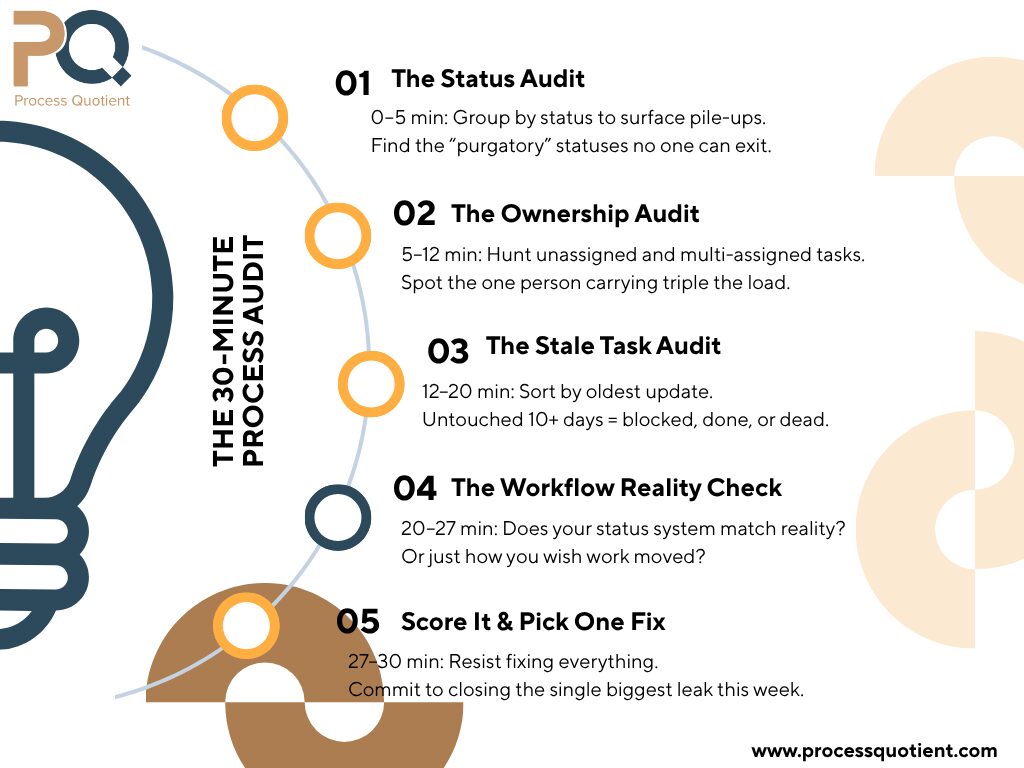
Minutes 0–5: The Status Audit
Open your main project view and group by status.
You’re looking for two things: pile-ups and purgatory.
A pile-up is a status with way too many tasks stacked in it. If forty tasks are sitting in “IN PROGRESS,” nothing is actually in progress — that’s a parking lot wearing a progress label.
Purgatory is the status nobody knows the exit criteria for. The classic offender is a vague “In Progress” or “Working On It” that means everything and therefore means nothing. If your team can’t tell you the precise condition that moves a task out of a status, that status is where accountability goes to die.
Write down: the two statuses holding the most tasks, and any status whose definition your team would describe differently from each other.
Minutes 5–12: The Ownership Audit
Now filter for ownership problems. You’re hunting three patterns:
- Unassigned tasks. Filter for tasks with no assignee. Every one of these is a task nobody owns — which means it’s a task that will silently rot. This is the single most common source of “I thought you were handling that.”
- Multi-assigned tasks. Filter for tasks with more than one assignee. Shared ownership is no ownership. When two people are assigned, each quietly assumes the other has it. One person owns the task. Always. (Collaborators go in a people field, not the assignee field.)
- The lopsided load. Group by assignee. Is one person holding three times the open tasks of everyone else? That’s not a productivity problem — it’s a bottleneck you can see coming a mile away.
Write down: your count of unassigned tasks, your count of multi-assigned tasks, and the name of anyone clearly overloaded.
Minutes 12–20: The Stale Task Audit
This is where the real time wasters hide.
Sort your tasks by “date updated,” oldest first. Now look at anything that hasn’t moved in 10+ days but isn’t marked done, blocked, or parked in a deliberate “REFERENCE”-type status.
Each of those is a quiet leak. A task that’s “active” but hasn’t been touched in two weeks is one of three things:
- Actually blocked — but never marked as such, so nobody’s clearing the blocker.
- Actually done — but never closed, so it’s clogging your view and inflating your “open work.”
- Actually abandoned — but never killed, so it haunts your reporting forever.
For each stale task, you only need to answer one question: what’s the real status? Blocked, done, or dead. Move it accordingly.
Write down: how many stale tasks you found. This number is usually the gut-punch of the whole audit.
Minutes 20–27: The Workflow Reality Check
Pull up your status list and ask the hardest question in the audit: does this workflow match how work actually moves — or how we wish it moved?
The tell is a status your team routinely skips or a stage of real work that has no status at all. If half your projects go through a client-review step but there’s no “EXTERNAL WAIT/REVIEW” status, those tasks are lying about where they are the entire time they’re with the client.
A status system should be a mirror of reality, not a wish list. If the map doesn’t match the territory, the map is the problem.
While you’re here, check one more thing: priorities. If more than one task per person is flagged urgent, your priority system is decorative. When everything’s urgent, nothing is.
Write down: any real stage of work missing a status, and whether your “urgent” flags are actually meaningful.
Minutes 27–30: Score It and Pick the One Fix
You now have a page of notes. Resist the urge to fix all of it. Pick the single biggest leak and commit to closing it this week. Usually it’s one of these:
- Unassigned and multi-assigned tasks → enforce one assignee per task
- A pile-up status with no exit criteria → write the criteria and clear the lot
- A wall of stale tasks → run a weekly 10-minute “what’s the real status” sweep
- A workflow that doesn’t match reality → add the missing status
One fix, done fully, beats five fixes started and abandoned.
It’s the Formula in Reverse
If you’ve followed our work, you know the Clear Task Ownership Formula:
Clear Task Creation + Smart Status Systems + Role Responsible Fields = Automatic Accountability
This audit is that formula run backwards. Every problem you just found maps to a missing component:
- Stale and ambiguous tasks → a Clear Task Creation gap
- Pile-ups and purgatory statuses → a Smart Status System gap
- Unassigned and orphaned work → a Role Responsible gap
So the audit doesn’t just tell you what’s broken. It tells you which part of the system to rebuild. That’s the difference between “our ClickUp is messy” and “we have a status-criteria problem in our review stage” — one is a complaint, the other is a fix.
Run It Before Q3
Six months of friction is a lot. Six more is a choice. Thirty minutes today tells you exactly where your team’s time is going — and gives you one concrete fix to make the back half of the year run cleaner than the front.
Want the version you can actually check off as you go? Grab The 30-Minute Process Audit Checklist — the same step-by-step we use, formatted so you can run it in one sitting without losing your place.
And if the audit surfaces more than you want to untangle alone, that’s exactly the kind of thing we fix for service teams every day. [Book a call] and we’ll walk your workspace together.
Your biggest time waster is already sitting in your workspace, fully documented. Go find it.